Showing posts with label Quantum GIS. Show all posts

Saturday, February 23, 2013

Clipperton Island FR - It Has Been a Long Time Between Maps and Why.

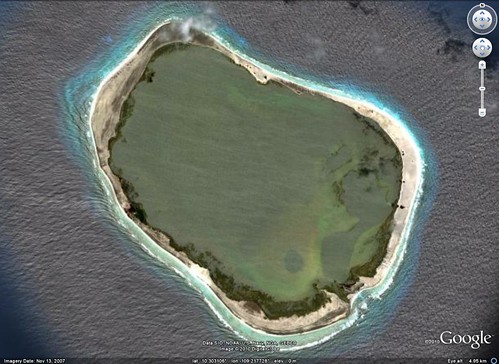
Clipperton Island - DigitalGlobe from Google Earth 
Clipperton Island - DigitalGlobe Image taken from Google Earth

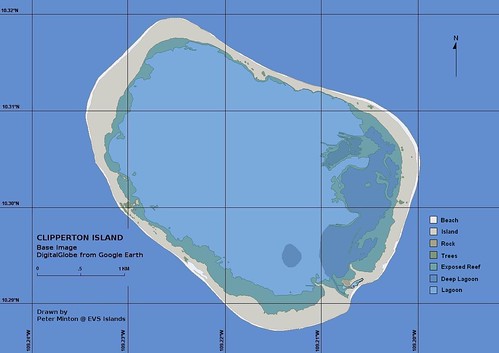
Clipperton Island - EEVS Map (1-17030) 
Clipperton Island - EEVS Precision Map (1:17030)

Taking advantage of DigitalGlobes hi-res imagery found in Google Earth, I was able to redo my original EVS precision map of Clipperton Island into an EEVS (Extremely Enhanced Vector Shoreline) precision map.  Clipperton remains a popular, but long-distant fishing destination for long range boats from San Diego, my home town.  It is also one of the only French possessions located in the Pacific Ocean.  Besides the fishermen, DX'ers love to transmit and receive QSL's from this remote atoll.

I have been a busy map maker these past four months. My day job, as many of you know, is a middle school teacher. That means that every weekday I attempt to teach meaningful Social Studies lessons to a room full of less-than-eager students. This year I am trying something different, I teach Social Studies lessons using both Google Earth and Quantum GIS mapping software.

For example, my 6th grade students have just begun a unit on China.  As an entertaining but hopefully, useful exercise, I listed 15 cities, tourist locations, landmarks, etc., found in China.  The students had to locate them in Google Earth, take a screen shot, id the image, place it in a folder on their virtual desktop, and when complete submit the folder to me using Shared Documents.  My objectives - students get an introduction to the geography of China, they use Google Earth as a learning tool, they enhanced their image handling skills, and they have fun with geography while learning.

We will work with QGIS (Quantum GIS) during this unit.  I always like the students to create a vector layer of information on top of a georectified image.  This sort of project requires a great deal of patience and usage of a teaching method I call the "Louder Method".  If they don't get it the first time, just say it louder the next few times.  I'm just kidding.  Really.  REALLY!!

Enjoy!

Thoughts - Quantum GIS, Africa and 6th Graders, A Recipe for Mapping Success.

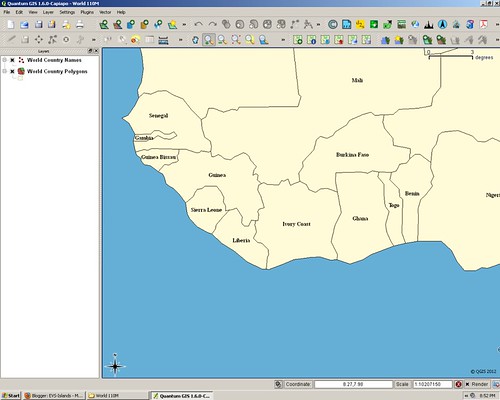
QGIS West Africa Map

If you have followed my posts you know that I do most of my mapping work in Global Mapper, a solid mapping program that is easy to use and handles very large format image files with ease (Landsat, SRTM, GeoTIFF). However, it costs real dollars. Big bucks for me and unaffordable bucks to outfit each student workstation with a mapping package.  I have spent the last year learning how to make maps using Quantum GIS (QGIS), a well-maintained and powerful open-source mapping package.

I teach middle school students between the ages of 11 to 14, social studies which includes world history, US history and geography. We spend a good deal of time working with open-source software (OpenOffice, Irfanview, Audacity, etc.) to learn about our world and how to make effective use of technology in the classroom. I have always wanted to bring mapping into the classroom. This year I decided to give QGIS a try with my students. I was determined to teach my students how to identify and display spatial data on a map. That brings me to the West Africa map and QGIS..

This year all of my students are learning to make maps. They have learned the difference between vector files and raster images. They are becoming adept at labeling countries, cities, empires and city-states. They love to use all the wrong colors and fonts, but I let them because they are having fun making maps.  So far the projects have been relatively simple, but challenging in a mapping sort of way.

Today, my 6th graders (11-years old) were identifying and labeling countries in Africa using QGIS and a variety of vector files and a large format raster image of Africa taken from the Natural Earth website. They finished the country identification phase of the mapping project and wondered what to do next. I said, "Make a capital city point file and identify and label African country's capital cities."  In the past, I would have labored long and hard to teach them how to make and use a point file. We would have spent a great deal of time setting up the symbology and label parameters.  However, today within minutes all of the students created their capital city point file, defined parameters and were busy plotting capital cities. How cool is that!

Enjoy! I know I sure am!